Tuesday, January 11, 2011


Creating a simple Excel User Form
Get a jump start on Excel VBA with the following book available now at Amazon.com!
Monday, January 10, 2011
Scroll Bars - Financial Modelling
What do you do when you are given a set of targets to meet with a forecast that is not quite meeting them? You may have several variables involved and you need to find what affect each change has to your model. As they say, a picture is worth a thousand words, and when dealing with data it could be no further from the truth.
Enter the scroll bars pared with charting (click on image for full view):
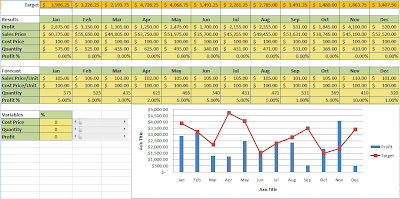


Did you notice how the chart to the lower right is impacted by the change in variables?
For the user, you simply one or more of the scroll bars up/down to increase or reduce these input values to see (in real time) the impact within the chart to the lower right. To create these scroll bars, you need to follow these 5 simple steps:
- From the developer ribbon select insert then choose the following:
- From the location you wish to locate this control click and drag to the size you wish this to be.
- Right click and select format control.
- From the control tab you can set your minimum and maximum values for this control and by what increment each click will change it.
- In cell link choose the destination for the value present in the scroll bar.

For a more about modeling with Excel 2007
Sunday, January 9, 2011
Buttons that Pop-Up
Create Pop Up User Message Boxes
This clip demonstrates how easy it is to generate pop-up windows with buttons where you can incorporate user feedback as variables within your code. Using these options allow you to expand your macros beyond simply automating repetitive tasks to incorporating differing scenarios to drive what macro or function to use next.
Subscribe to:
Posts (Atom)