Thursday, May 10, 2012
VBA Programming in Excel 2010
Are you upgrading to Excel 2010 soon? My suggestion would be to familiarize yourself with all the rich features now! Unlock your full potential with the following release from John Walkenbach available now on Amazon.com:


Friday, February 10, 2012
Saturday, May 7, 2011
Data Validation List based on another data validation list
Have you ever thought how simple life could be if you could make your spreadsheets act more like a form without going through the trouble of creating one? In today's example you can create a list of values in one field where another list is populated based on what the user selects!
Sub list2()
With Cells(1, 2).Validation
.Delete
If Cells(1, 1) = "one" Then
.Add Type:=xlValidateList, Formula1:="A, B, C"
ElseIf Cells(1, 1) = "two" Then
.Add Type:=xlValidateList, Formula1:="D, E, F"
ElseIf Cells(1, 1) = "three" Then
.Add Type:=xlValidateList, Formula1:="G, H, I"
End If
End With
End Sub
The above example will only refresh when the macro is run. If you want this to run as soon as a value is chosen you may want to set this into the worksheet where an event will trigger it to run.
Thursday, March 3, 2011
Unhiding Multiple Worksheets
Most people who use Excel know that you can hide one or more sheets in Excel. Thanks to thesimplemachine.com we now have a short code for unhiding these sheets all at once rather than one at a time. Take a look!
Unhiding Multiple Sheets with VBA
Tuesday, March 1, 2011
Edit Multiple Selections in Excel Drop Down Lists
Microsoft has come up with an amazing array of features in Excel. One such feature is the drop down list which creates the ability for the user to provide feedback that drives other parts of the workbook. Gathering feedback from your audience not only allows your them to change scenarios as they see fit but it prevents you from recreating reports for each scenario.
Contextures Blog » Edit Multiple Selections in Excel Drop Down Lists
As with any feature there are limitations. This is where the beauty of VBA comes into play! In yesterday's blog post from Contextures.com we are shown how you can handle problems with editing drop down lists:
Monday, February 28, 2011
Thursday, February 24, 2011

Creating arrays using VBA
Now with an understanding of the power of arrays we can build upon this using VBA. Here is a very thorough overview of arrays from a highly respected source:
Please visit our sponsors to the right for more resources available on Excel & VBA today!
Please visit our sponsors to the right for more resources available on Excel & VBA today!
Tuesday, February 22, 2011
Saturday, February 19, 2011
Friday, February 18, 2011
Thursday, February 17, 2011
Wednesday, February 16, 2011
Tuesday, February 15, 2011
Thursday, February 10, 2011
Valentines Day Excel Workbook VBA
Admittedly, this could be made into so much more of an elaborate greeting but then perhaps flowers or chocolates would be more suitable.
This short script, when placed within the 'This Workbook' section in the project section in your VB browser, will activate any time a change is made to that workbook (i.e. selecting a cell).
Private Sub Worksheet_SelectionChange(ByVal Target As Range)
x = MsgBox("Will you be my valentine?", vbYesNo, "Valentine Greeting")
If x = 6 Then
MsgBox "I am yours"
Else
MsgBox "Happy Valentines Day!"
End If
End Sub
As you can see, a pop-up window will appear with the question "Will you be my valentine?" If the user selects yes you see a new pop-up window with "I am yours". If no is selected they will only see "Happy Valentines Day!". Surprise the Excel geek in your life with a workbook today and a custom message of your choosing and have a happy valentine's day!
Wednesday, February 9, 2011
Tuesday, February 8, 2011
Monday, February 7, 2011
Highlight fields in vba rather than conditional formatting
Ever wanted to quickly highlight cells where the values are not found in another list? Here is an example of how VBA can accomplish just that!
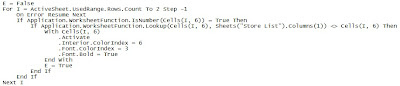

Notice that there is an error handling used 'On Error Resume Next'? If you run this macro without it you will have problems but this statement allows the script to continue on even though the error exists!
Subscribe to:
Posts (Atom)